


Marketplace: Buy, Sell, Tradet
4.41.18K Reviews
App Specs
- Version
- 4.3.16
- Updated On
- License
- Free
- Downloads
- 1,000,000+
- Developer
- MarketPlace
- Categories
- Shopping
- Platform
- Android, iOS
Screenshots




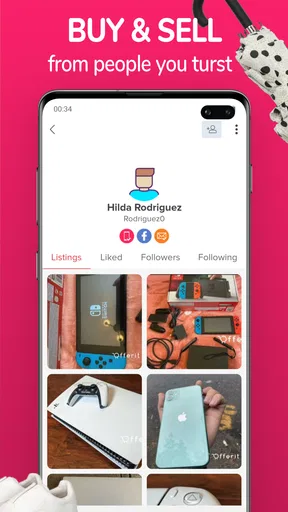

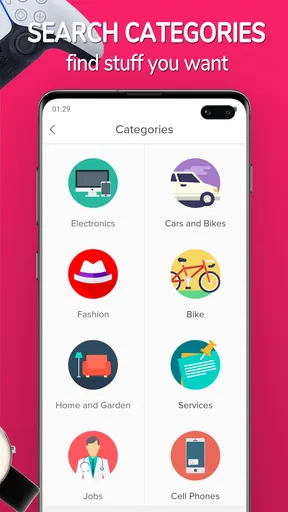
 Analysis by AppCompare
I judge a local marketplace by what it helps me do after the first search: spot a useful deal, ask the right questions, and decide whether a handoff is worth arranging. Marketplace: Buy, Sell, Tradet is aimed at that practical cycle, bringing shopping and secondhand selling together rather than treating them as separate activities. Its extra emphasis on trading gives it a distinct angle, though a good outcome still depends on the listings and people available near you.
A nearby-marketplace mindset
That local focus shapes how I would use it. A low price is only part of a deal when an item is bulky, collection takes time, or the seller is far away. Before messaging, I would check the listing carefully, compare the asking price with similar items, and work out whether collection is realistic. Those small checks matter more here than simply browsing attractive photos.
For a typical week, imagine replacing a desk chair or clearing a spare kitchen appliance. I would search first, save a few plausible options mentally or in my own notes, then message sellers with specific questions about condition, dimensions, and collection. For the item I am selling, I would take clear photos in good light and describe wear honestly. That workflow helps reduce wasted trips and vague conversations, even when a listing looks promising.
Getting Started with Marketplace: Buy, Sell, Trade
First things first, downloading and setting up Marketplace: Buy, Sell, Trade is a breeze. Available on both Android and iOS, the app is free to download and takes up minimal space. Once installed, you're greeted with a clean, intuitive interface—no frills, just the essentials. The registration process is straightforward, requiring just your basic info or a quick sign-in via Facebook or Google. Voila! You're all set to explore.
Browsing and Buying
As you navigate through the app, you'll notice how easy it is to browse through listings. Categories are well-organized, letting you filter items by location, price, and condition. Whether you're looking for a gently used couch or a brand-new gadget, the app's search functionality is robust enough to find what you need without breaking a sweat.
The product listings are detailed, with multiple photos, descriptions, and seller ratings. This transparency is a strong point, ensuring you're making informed decisions before hitting that "buy" button. Plus, the in-app chat feature allows you to communicate directly with sellers, making negotiations and inquiries a breeze.
Making a message count
One useful habit is to ask questions that lead to a clear decision, rather than opening with a generic “Is this available?” For furniture, I would confirm dimensions and whether the item has visible damage; for electronics, I would ask what is included and whether the pictured condition reflects the item now. A concise message saves time for both sides and gives the seller a chance to clarify details before anyone plans a meetup.
Worth Reading Before You Choose

EA SPORTS FC Mobile 26 Is a Bigger Football Game, but It Takes Time

Flipboard Shows What News Apps Must Do Beyond the Feed

Switching to Android Auto Means Rethinking Your Driving Routine

Google Calendar Makes a Crowded Week Easier to Manage

Ludo King Makes the Most of the Minutes Between Plans

Baby Panda World Brings Quick Play to Modern Phones, but Its Game Library Feels Busy
I would also treat ratings and reviews as context, not a guarantee. A positive history can help me judge whether a conversation feels reliable, but it cannot replace checking the item itself or agreeing on practical details. If something in the description and the seller’s answer does not line up, I would pause rather than let a low price rush the decision.
Selling Made Simple
If you're on the selling end, the app doesn't disappoint. Posting an item for sale is as easy as pie. Just snap a few photos, write a catchy description, and set your price. The app even offers suggestions to help you price your items competitively. Once your listing is live, you can manage it effortlessly, track views, and respond to potential buyers through the app's messaging system.
Turning clutter into a workable listing
For a seller, the best first step is deciding what a stranger needs to know before making contact. Photograph the item from more than one useful angle, include flaws instead of hiding them, and put measurements or model details in the description when they matter. A clear listing may attract fewer casual questions and more buyers who already understand what they are considering.
Views are a signal of attention, not proof that a price is right or a sale is close. If interest is quiet, I would revisit the first photo and description before changing the price; if people ask the same question repeatedly, I would add the answer to the listing. This makes the management tools more useful: they can help identify where a listing is losing potential buyers, even without guaranteeing a quick sale.
Trading: The Unique Twist
Now, here's where things get interesting. Unlike many other platforms, Marketplace: Buy, Sell, Trade offers a trading feature. If you have items you're willing to swap, this feature connects you with others interested in bartering. It's a fantastic way to offload items you no longer need in exchange for something you do. The trade-off is seamless and adds a refreshing twist to the typical buying and selling model.
When a swap beats a sale
Trading is most appealing when I have a useful item but would rather receive something than manage a separate sale and purchase. A swap can be a practical match—for example, two people replacing household gear—if both sides agree that the items are in comparable condition and are clear about what is included. I would describe what I can offer and what I hope to find, while staying open to a different but fair proposal.
The catch is that barter depends on finding someone whose needs align with mine. Cash listings are easier to compare because the asking price gives a common reference point; with a swap, value is more personal and can be harder to settle. I would confirm the condition of both items and the handoff plan before agreeing. If I need a specific item quickly, buying it directly is usually more predictable than waiting for the right trade.
How it compares with familiar options
Compared with a conventional online shop, this kind of marketplace is better suited to secondhand finds, direct questions, and local handoffs than to a standardized checkout experience. Compared with a classifieds service focused mainly on cash listings, the ability to explore trades is a meaningful difference. That flexibility is useful if I am clearing out possessions, but a specialist retailer or a more structured shopping service may suit me better when I need a new product, dependable delivery, or a consistent return process.
It is also not automatically the best choice for every sale. If I am selling something that needs a broad audience, a platform with stronger reach in my area may produce more interest. Local supply matters: a well-designed search cannot surface the exact item if nobody nearby has listed it. I would use this app as one channel, not assume it replaces every marketplace or specialist resale option.
Safety and Security
Safety is a priority here. The app employs several features to ensure a secure experience, such as user verification, ratings, and reviews. You can check a seller’s credibility through their history and feedback from previous transactions. Plus, the app encourages safe practices like in-person meetups in public spaces, adding an extra layer of security.
Keeping the handoff sensible
For an in-person exchange, I would settle the basic terms in the chat first: which item is changing hands, its condition, the agreed amount or swap, and where to meet. A public place is a sensible choice, and I would avoid sharing unnecessary personal details while arranging the exchange. These precautions do not remove every risk, but they help keep a casual transaction from becoming unclear or uncomfortable.
Buyers should remember that a seller rating reflects past feedback, not a physical inspection of the item they are about to collect. Sellers, meanwhile, should be wary of conversations that become confusing about the agreed price or handoff. If either side feels pressured or the arrangement changes at the last moment, walking away is more prudent than trying to salvage a questionable deal.
Cost, access, and who should try it
The app is free to download and is listed for Everyone, so there is no upfront purchase required to try the marketplace. It is developed by MarketPlace, has a 3.9 average from around 6,300 ratings, and has been installed over a million times. The current version is 4.3.10, with Android 6.0 as the minimum system requirement. Those details make it straightforward to assess basic compatibility, while the in-app purchase range of $2.99 to $59.99 per item is worth keeping in mind if an optional purchase becomes relevant to your use.
I see the strongest fit for people who regularly buy or pass on household goods, enjoy checking local secondhand listings, or are genuinely open to swapping rather than insisting on cash. It can also suit someone who wants to test a sale without building a complicated shop presence. I would skip it if I need a guaranteed delivery window, a conventional retailer’s purchase protections, or an immediate match for a very specific item. Those needs call for a different kind of service.
User Experience and Support
The overall user experience is quite impressive. The app runs smoothly, with minimal lag or crashes. Its simplicity is its strength, focusing on core functionalities without unnecessary clutter. If you run into any issues, the customer support is prompt and helpful, addressing queries through in-app support or email.
What I would check before relying on it
My practical test would be to search for a few items I might actually buy, not just browse whatever catches my eye. That quickly shows whether local listings match my interests and whether the asking prices make sense. I would then try drafting one listing for an item I already own, making sure I can explain its condition clearly and handle messages in a timely way. A marketplace works best when both sides respond with enough detail to keep plans moving.
For anyone wondering whether the app is only for buying, its selling and trade-oriented approach makes it relevant on both sides of a transaction. The more important question is whether its local activity suits your needs. If you only want to browse, you can still assess the selection before committing to a purchase; if you plan to sell, be ready to photograph, describe, and coordinate rather than expecting the app to do that work for you.
To sum it up, Marketplace: Buy, Sell, Trade delivers on its promise to simplify your buying, selling, and trading needs. Its user-friendly design, robust features, and secure environment make it a standout choice in the crowded world of marketplace apps. Whether you're a buyer hunting for deals or a seller looking to declutter, this app might just be the tool you need to streamline your commerce activities. Happy trading!
Pros
- User-friendly interface for easy navigation.
- Wide variety of categories and items.
- Secure payment options available.
- Supports multiple languages for global users.
- Efficient search and filter functions.
Cons
- Occasional app crashes during peak times.
- Limited customer support availability.
- Inconsistent seller response times.
- Some listings lack detailed descriptions.
- No offline access for browsing items.
FAQs for Marketplace: Buy, Sell, Tradet
What is Marketplace: Buy, Sell, Trade, and how does it work?
Marketplace: Buy, Sell, Trade is a versatile app designed to connect buyers and sellers within a local community. Users can list items for sale, browse through available products, and communicate directly with sellers to negotiate prices or ask questions. It functions as a convenient and user-friendly platform for trading goods securely.
Is Marketplace: Buy, Sell, Trade safe to use?
Yes, Marketplace: Buy, Sell, Trade prioritizes user safety. The app incorporates features like user ratings and reviews to build trust among its community. Additionally, it offers secure payment options and guidelines for safe transactions. However, users are encouraged to meet in public places for exchanges and to report any suspicious activity.
Are there any fees associated with using Marketplace: Buy, Sell, Trade?
The basic use of Marketplace: Buy, Sell, Trade is free. Users can list items and browse without cost. However, there may be optional in-app purchases for premium features, such as highlighted listings or advanced search filters. Details about these costs can be found within the app's settings or help section.
What types of items can I buy or sell on Marketplace: Buy, Sell, Trade?
Marketplace: Buy, Sell, Trade supports a wide range of categories, including electronics, clothing, furniture, and vehicles. Users can also find or list services, such as home repairs or tutoring. However, there are restrictions on prohibited items, which can be reviewed in the app’s terms of service to ensure compliance.
How do I resolve disputes or issues with transactions on Marketplace: Buy, Sell, Trade?
In case of a dispute, users are encouraged to communicate directly through the app’s messaging system to resolve the issue. If a resolution can't be reached, the app provides a support team that can mediate and advise on further steps. It's important to document all communications and agreements for reference.


